Time Zone Meeting Planner
See everyone's working hours side by side and pick a time that works across time zones. Daylight saving is handled for the exact date. Copy the invite, add it to your calendar or share the link. Free, no sign-up, no ads.
Loading the planner...
Free meeting planner by ISTRALLEN. Your cities stay in your browser unless you share a link. Estimating a sprint? Try Planning Poker.
How it works
- Add the cities. Type a city or a time zone. Your own city is added automatically, and the first row is the home city that sets the hour columns.
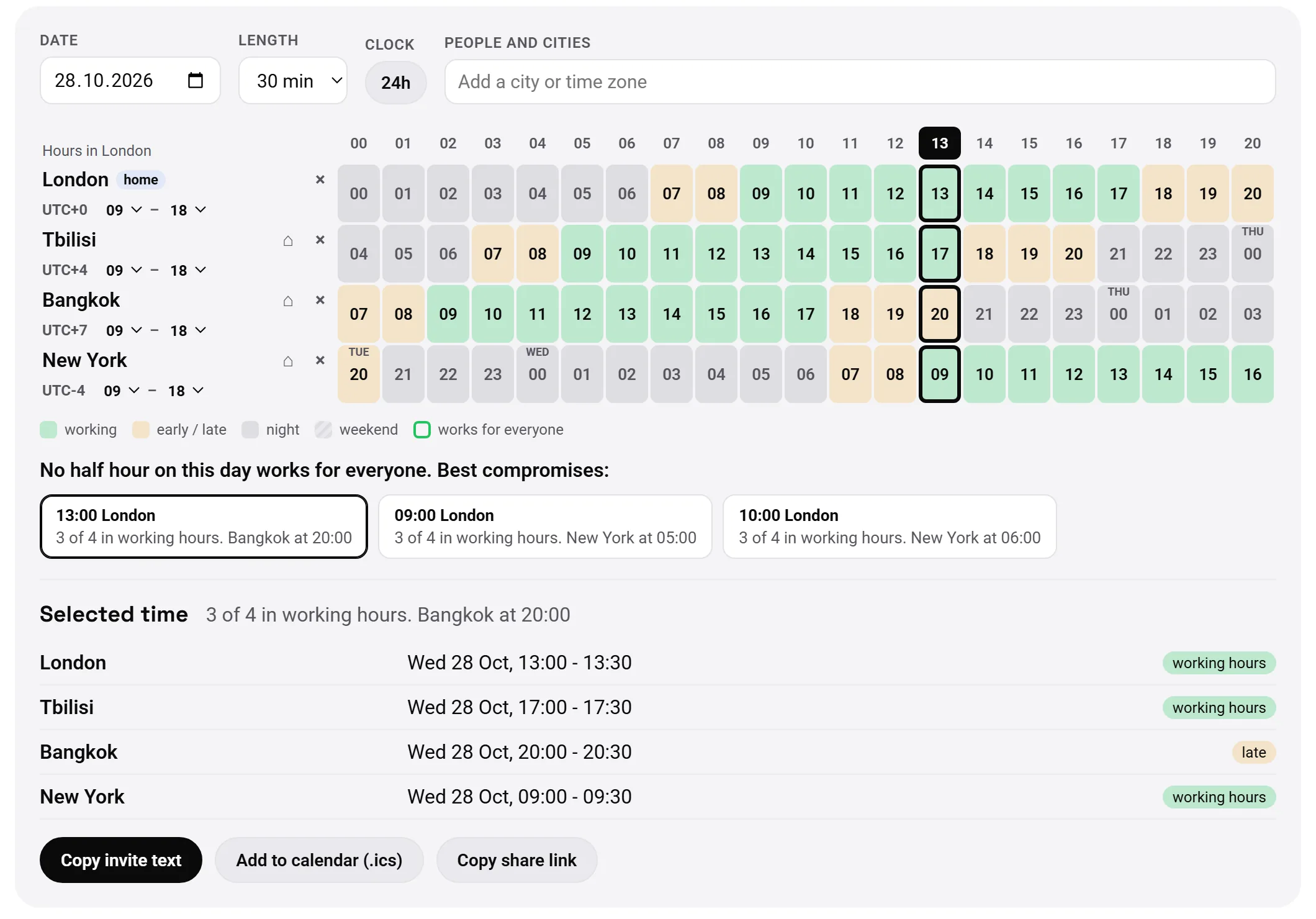
- Read the grid. Each row is a city, each column is an hour. Green means working hours, amber is early or late, grey is night, stripes are the weekend: Saturday and Sunday, or Friday and Saturday in countries such as Israel, Saudi Arabia and Egypt.
- Find the overlap. Columns outlined in green work for everyone. If there is no such hour, the planner lists the best compromises and tells you who would be outside working hours.
- Adjust working hours. Someone starts at 11:00 or leaves at 16:00? Change the hours in their row and the grid updates.
- Send it. Pick a slot, then copy the invite text, download an .ics file for your calendar, or copy a link that opens the same view for your team.
Why daylight saving trips people up
Most people keep the usual difference in their head: London is 5 hours ahead of New York, Berlin is 1 hour ahead of London. That works most of the year, but countries change their clocks on different dates.
In 2026 the UK moves to winter time on 25 October, while the US waits until 1 November. For that week London is only 4 hours ahead of New York, and a call set "as usual" lands an hour off for one side. The same happens in spring, and some countries, like most of Asia, never change clocks at all.
The planner doesn't use fixed offsets. It asks your browser's time zone database what the time will be in every city on the exact date you pick, so the grid stays right across these switches.
Tips for meetings across time zones
- Rotate the inconvenience. If there is no hour that suits everyone, don't always put the same city at 7:00 or 21:00. Alternate between the best compromises week by week.
- Keep the overlap for talking. Shared working hours are scarce on distributed teams. Use them for discussions and decisions, and move status updates to written async notes.
- Always write the time with the city. "15:00 London / 10:00 New York" leaves no room for mistakes. The invite text from the planner does this for you.
- Check the date, not just the hour. A late afternoon call in California is already tomorrow in Singapore. The grid marks the day change in every row.
FAQ
How do I find the best meeting time across time zones?
Add a city for each participant. Green cells are working hours, and columns outlined in green work for everyone. If no hour works for everyone, the planner lists the best compromises and says who would be outside working hours.
Does it handle daylight saving time?
Yes. Times are calculated with your browser's time zone database for the exact date you pick. That matters because countries change clocks on different dates: for about a week in late October, London and New York are 4 hours apart instead of the usual 5.
Can each person have different working hours?
Yes. Every city row has its own working hours, 9:00 to 18:00 by default. Change them for someone who starts late or finishes early, and the grid updates.
How do I send the meeting time to my team?
Pick a slot, then copy a ready invite text with the time in every city, download an .ics file for Google Calendar, Outlook or Apple Calendar, or copy a share link that opens the same grid for your teammates.
Does it work with half-hour time zones like India or Nepal?
Yes. Offsets such as UTC+5:30 (India), UTC+5:45 (Nepal) and UTC-2:30 (Newfoundland in summer) are shown with minutes.
Is it free? Do I need an account?
It is free, with no sign-up and no ads. The planner runs in your browser: your cities are kept in your browser's local storage and are not sent to our server. The only exception is a share link you create: the cities are written into that link.
How are weekends handled?
Weekends follow the usual working week of each country: Saturday and Sunday by default, Friday and Saturday in countries such as Israel, Saudi Arabia, Egypt, Qatar and Jordan. Public holidays are not marked.
How many cities can I compare?
Up to 10 cities or time zones at once.
Building a product with a distributed team?
This tool is made by ISTRALLEN. We build backends, payment and API integrations, and production AI features for product teams.